
Formatting the spreadsheet
The sheet is the list Entrance sends to. A column the message never names is ignored. A column the message does name is inserted as written.
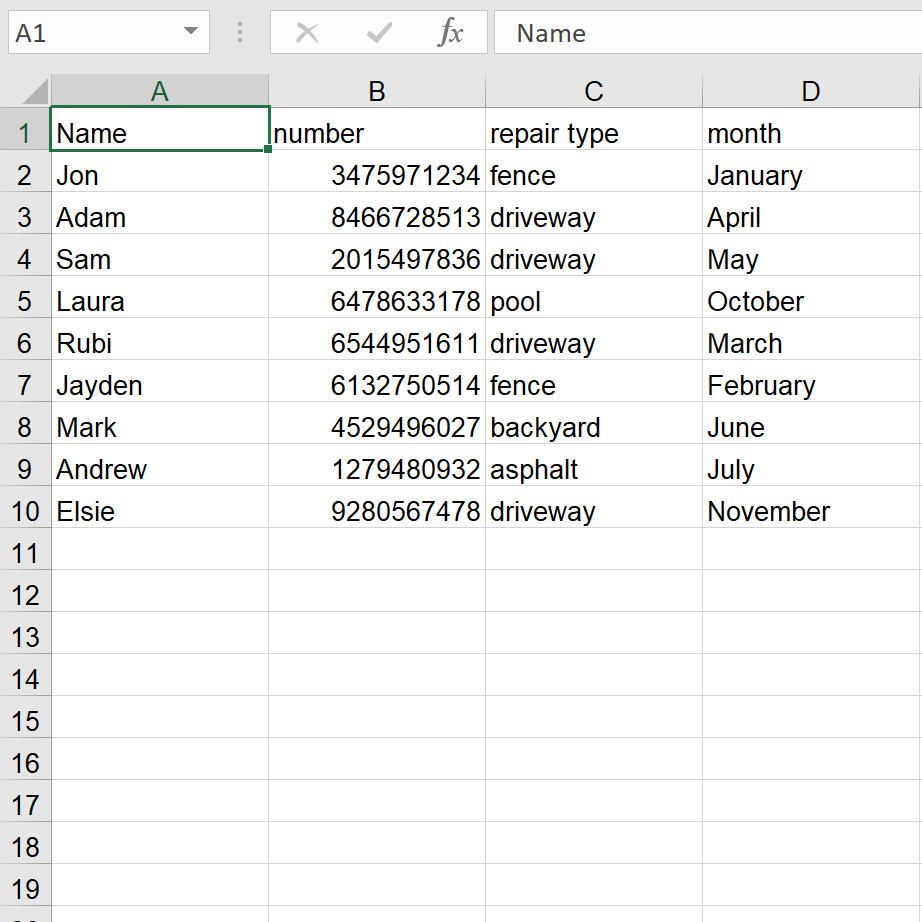
What the file needs
A name column. The example uses Name.
A column named number, with the mobile number.
Any other field you will quote, with a header you are willing to type in braces. In the sheet above, {repair type} and {month} are the headers repair type and month.
For that file, the message is:
Hey {Name}, Ernesto from Ernesto’s Home and Yard Repair here. I repaired your {repair type} in {month}. Any repair booked before New Year’s is 20 percent off. Reply if you want it on the calendar.
Extra columns are fine. They stay out of the text unless you name them.
If a contact has a second mobile and you are not sure which one is right, add a column named Number2, spelled that way. Entrance uses it when number does not go through.
Before a large send
Write the cells the way they should sound in a sentence. “June” belongs in a sentence. “June 3, 2021” often does not. The formatting note shows the same message with a bad cell.
You can preview the filled-in messages before the campaign goes out. Send the test to your own phone from the campaign setup first.